android wifi tether
Use Your Android Phone as a Wireless Hub for FREE! (Updated)
For you all who have an Android OS phones I have a something good for you! If you have a data plan on your phone you can share the internet from your phone with other wifi devices. That means internet wherever you go. Cell carriers charge $30 or more for this service. Thanks to these 2 easy apps it’s free. First and foremost your phone needs to be rooted which allows the use of the 2nd app. Rooted basically means having access to a folder named “root” in your phone’s OS. Accessing the root for Android would be the equivalent to jail-braking an iPhone. To truly root your phone permanently there are options that range from rewriting code to following steps with rooting apps. Enter z4root! This app is one of the easiest of them all but it’s not permanent. You hit a button in the app and you’re rooted until you restart your phone (hit the button again to regain root). Then comes the wifi tether for root users app. It’s also easy to use and has the usual options for a wireless router.
Step 1. download and install the z4root and the wifi tether app files from below. (you can access the blog from your phone. It’s a direct downloads)
Step 2. open z4root and hit the “temporary root” button. It will take a few seconds.
http://dl.dropbox.com/u/17911061/z4root%201.3.0.apk (copyright 2010 RyanZA)

Step 3. open wireless tether.
http://dl.dropbox.com/u/17911061/Wireless%20Tether%202.0.5.apk
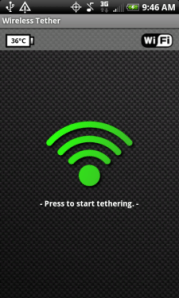
4. When it opens select the menu button on your phone. go to settings and change the SSID. That will be the name of your network.
5. When you search for and connect to your network from wifi device, you will have to accept your device connection. There will be a shielf with an red x. Click the red x and accept with a check mark, your wireless device.
That’s IT! ——-> if you have any questions leave it in the comments or send me an email.. theurbantech@gmail.com
(disclaimer!!!! use at your own risk) 🙂
If you want a traditional true root, I have a homeboy who works remotely…just let me know lol
(Update) More and more phones might not be rootable with z4 root, if that’s your case then try SuperOneSlick by shortfuse. It’s an easy app that roots your phone from your computer with basically one click. Find it HERE (the download is after the version changes info)
 the urban tech