android root
Received My HTC Evo 4G LTE! & Root Instructions!
I pre-ordered my phone from Best Buy and finally received the phone after many days of waiting because of U.S. Customs issues. I was able to use the Phone Freedom & Pre Order $50 gift cards for the purchase but I will say it took a fight of 3 hours! I had to prove to the manager that I could use both gift cards for the purchase. Thankfully it was all in writing from BB! 🙂 The phone is a monster. I owned the original Evo but traded it for the Epic because I needed a qwerty keyboard. The screen on the new Evo is so big I can comfortably type with 2 thumbs and now I can say I am satisfied. This phone is so thin you will need some protection so I recommend a hard case and a screen protecter.
Pros:
- 1.5 GHz dual core processor
- 8MP Camera w/flash (can do many frames a second), Front facing 1.3MP camera
- beautiful 4.7inch HD 720p screen
- Android OS 4.0 (Ice Cream Sandwich)
- HTC Sense 4 User Interface (UI)
- Large capacity battery
- A kickstand
- Plus many more!
Cons:
- No LTE currently, only operates on the 3G for now which is slow
- 3G doesn’t want to stay connected all the time. Randomly turns off.
- Network seems a bit wacky, my signal goes from 2 bars to 5 bars to no bars then to roaming often.
- Audio at times goes from loud to soft, I’m sure the Beats Audio equalizing has something to do with that. Gets annoying.
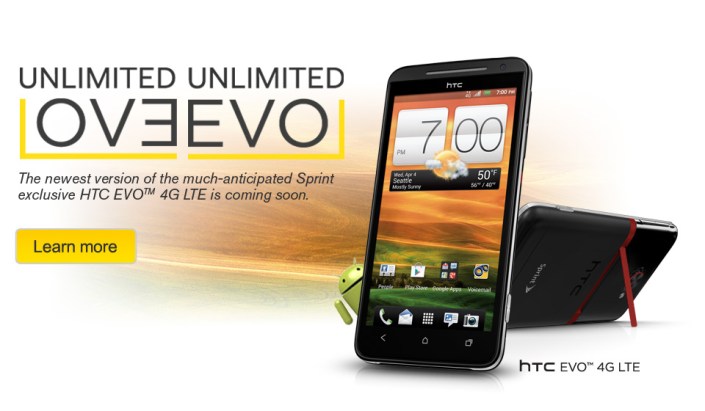
This is what I’ve found while on my 2nd day of playing with the phone. I’m sure things will get better with the networkwhen Sprint finishes out its Now Network build. There is already root access for the phone and is simple to do. Overall it’s a great phone. If you have any questions shoot me an email, Thanks! .Root information below thanks to the good folks over at XDA Developers: Link for download
For Windows, update drivers using driver files below then double-click on runme.bat.
For Linux, no drivers needed, unzip Evo4GLTERoot.zip to your Downloads directory then open up a terminal and do:
cd Downloads/Evo4GLTERoot
chmod 755 *
sudo ./adb-linux devices
Then do:
sh runmelinux.sh
For Mac, no drivers needed, unzip Evo4GLTERoot.zip to your Downloads directory then open up a terminal and do:
cd Downloads/Evo4GLTERoot
chmod 755 *
sh runmemac.sh
Use Your Android Phone as a Wireless Hub for FREE! (Updated)
For you all who have an Android OS phones I have a something good for you! If you have a data plan on your phone you can share the internet from your phone with other wifi devices. That means internet wherever you go. Cell carriers charge $30 or more for this service. Thanks to these 2 easy apps it’s free. First and foremost your phone needs to be rooted which allows the use of the 2nd app. Rooted basically means having access to a folder named “root” in your phone’s OS. Accessing the root for Android would be the equivalent to jail-braking an iPhone. To truly root your phone permanently there are options that range from rewriting code to following steps with rooting apps. Enter z4root! This app is one of the easiest of them all but it’s not permanent. You hit a button in the app and you’re rooted until you restart your phone (hit the button again to regain root). Then comes the wifi tether for root users app. It’s also easy to use and has the usual options for a wireless router.
Step 1. download and install the z4root and the wifi tether app files from below. (you can access the blog from your phone. It’s a direct downloads)
Step 2. open z4root and hit the “temporary root” button. It will take a few seconds.
http://dl.dropbox.com/u/17911061/z4root%201.3.0.apk (copyright 2010 RyanZA)

Step 3. open wireless tether.
http://dl.dropbox.com/u/17911061/Wireless%20Tether%202.0.5.apk
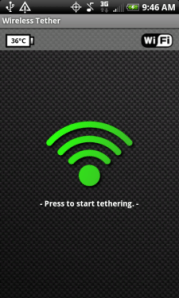
4. When it opens select the menu button on your phone. go to settings and change the SSID. That will be the name of your network.
5. When you search for and connect to your network from wifi device, you will have to accept your device connection. There will be a shielf with an red x. Click the red x and accept with a check mark, your wireless device.
That’s IT! ——-> if you have any questions leave it in the comments or send me an email.. theurbantech@gmail.com
(disclaimer!!!! use at your own risk) 🙂
If you want a traditional true root, I have a homeboy who works remotely…just let me know lol
(Update) More and more phones might not be rootable with z4 root, if that’s your case then try SuperOneSlick by shortfuse. It’s an easy app that roots your phone from your computer with basically one click. Find it HERE (the download is after the version changes info)
 the urban tech