Android
Instagram and FB’s Poke New Competitor? Snapchat
Happy New Year everyone!
Have you ever thought about sending someone a pic that self destruct after it’s been viewed? I couldn’t personally think of a reason to do that unless it involved not taking up space on my phone 🙂 For the people out there who would have other uses for that ability, there is an app for that! (a couple of apps now) Here comes SnapChat. It’s real-time picture chatting the company calls the fastest way to share a moment. Facebook came out with the app Poke that deletes photos also. (pics and vids can be retrieved up to 90 days later) Instagram doesn’t delete. Snapchat is new to the Android and iOS markets. It’s said to be the craze for teens – early 20s crowd. You can set the length the receiver views the picture and can be download it if you want. It informs you if it has been downloaded. The appeal for teens, I’m sure, in some aspect is hiding conversations, vids, or pics from parents …  What do you think?

A Great New App, Calculate on your screen with MyScript Calculator!
You all who use calculators often will like this free new app called MyScript Calculator. This app lets you hand write mathematical expressions using supported mathematical symbols: +, -, ×, /, √, Pi, parentheses, exponentiation. Use your finger or a stylus if you have one for your tablet or phone touch screen and watch the equation seemingly magically appear. The app is currently only for Android phones and is a lot of fun to play with and can be found in the app market on your phone. Check it out!
Use Your Android Phone as a Wireless Hub for FREE! (Updated)
For you all who have an Android OS phones I have a something good for you! If you have a data plan on your phone you can share the internet from your phone with other wifi devices. That means internet wherever you go. Cell carriers charge $30 or more for this service. Thanks to these 2 easy apps it’s free. First and foremost your phone needs to be rooted which allows the use of the 2nd app. Rooted basically means having access to a folder named “root” in your phone’s OS. Accessing the root for Android would be the equivalent to jail-braking an iPhone. To truly root your phone permanently there are options that range from rewriting code to following steps with rooting apps. Enter z4root! This app is one of the easiest of them all but it’s not permanent. You hit a button in the app and you’re rooted until you restart your phone (hit the button again to regain root). Then comes the wifi tether for root users app. It’s also easy to use and has the usual options for a wireless router.
Step 1. download and install the z4root and the wifi tether app files from below. (you can access the blog from your phone. It’s a direct downloads)
Step 2. open z4root and hit the “temporary root” button. It will take a few seconds.
http://dl.dropbox.com/u/17911061/z4root%201.3.0.apk (copyright 2010 RyanZA)

Step 3. open wireless tether.
http://dl.dropbox.com/u/17911061/Wireless%20Tether%202.0.5.apk
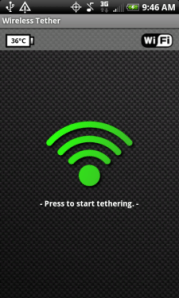
4. When it opens select the menu button on your phone. go to settings and change the SSID. That will be the name of your network.
5. When you search for and connect to your network from wifi device, you will have to accept your device connection. There will be a shielf with an red x. Click the red x and accept with a check mark, your wireless device.
That’s IT! ——-> if you have any questions leave it in the comments or send me an email.. theurbantech@gmail.com
(disclaimer!!!! use at your own risk) 🙂
If you want a traditional true root, I have a homeboy who works remotely…just let me know lol
(Update) More and more phones might not be rootable with z4 root, if that’s your case then try SuperOneSlick by shortfuse. It’s an easy app that roots your phone from your computer with basically one click. Find it HERE (the download is after the version changes info)
{iOS}{Android} Angry Birds
Angry Birds is amazingly fun. People say it is addictive. By experience, I must say it is quite habit forming. Basically the birds are angry at the pigs who stole their eggs. In game play you launch the birds at the pigs whom are in glass, wood, and cement structures. You can get it for the iPhone, iPad, or iPod touch from $.99 to $4.99. Also available for free (ad supported) on Android. I’m telling you, it’s not hype. Try it out.
{Android} Google Maps 5.0
The Android operating system is made by Google. With their operating system comes many great applications built in and Google Maps is one of them. Google Maps is a map application that ties into the turn by turn navigation software on the OS. It’s a great app for people who need to find their way 🙂 This latest version comes with these great features:
 Tilt Explore the map in 3D. Drag down with two fingers to tilt, and then zoom in on one of 100+ cities around the world with 3D buildings to see a skyline come to life.
 Rotate Look at the map from a new perspective. Twist with two fingers to rotate the map and view it from any direction.
 Compass mode Orient yourself on the map. Center on your location and tap the compass button. The Map flips into 3D and automatically rotates to whichever direction you’re facing.
 Smooth zooming See the map at the exact zoom level you want. Move two fingers together or apart. The map and labels zoom continuously with your fingers.
 Offline reliability Maps of the areas you use the most get preloaded in the background so you can see and interact with the map, even if you lose your connection temporarily.
 Offline rerouting Google Maps Navigation (Beta) automatically reroutes you, even if you lose your connection after starting a route.
Check it out!
If you have any questions regarding this app, hit me up.
 the urban tech